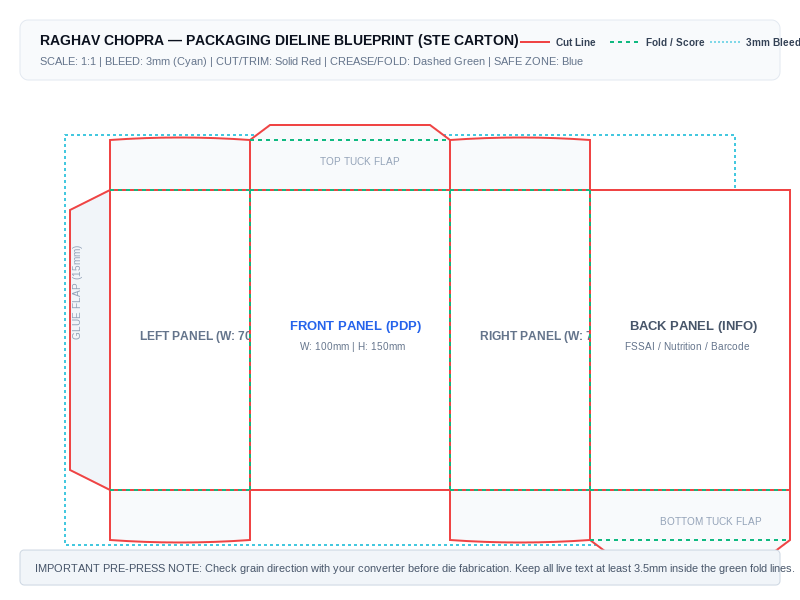
Everything you need before briefing a commercial printer or designing your first food carton: a 1:1 production-accurate vector dieline blueprint and a comprehensive 2026 pre-print regulatory compliance audit matrix.
Production Straight Tuck End (STE) Box Dieline (.SVG / .AI Ready)
Includes isolated cut lines (solid red), crease/fold lines (dashed green), glue flaps (15mm), and mandatory 3mm outer bleed boundaries.
2026 Pre-Print FSSAI Label Design Checklist
Quickly verify minimum font heights, veg/non-veg mark surface area scaling, mandatory PDP layout rules, and barcode quiet zones before hitting the press.
Prefer direct downloads without filling the form? You can access the open vector assets right here:
Standard 1:1 scale straight tuck end carton dieline vector drawing with bleed and crease lines.
Complete 6-point regulatory pre-flight checklist covering font sizes, symbols, allergen notes, and PDP rules.
A packaging dieline serves as the exact physical blueprint for die-making, cutting presses, and automated folding gluers. Misinterpreting line conventions is the single most common cause of commercial printing errors in India, resulting in ruined paperboard stock, shifted typography, and non-fitting boxes.
Represents physical razor-sharp steel rule cutting blades. Any artwork crossing this line without bleed will show raw unprinted paperboard edges if die registration shifts by even 0.5mm.
Represents rounded scoring bars that indent paperboard fibers without piercing. Keep critical logos and barcode lines at least 3mm away from fold lines to prevent cracking.
All background colors, patterns, and flood graphics must extend past the trim line to this outer boundary, ensuring clean edge-to-edge ink coverage after die-cutting.
The side tab where hot-melt adhesive secures the carton. Never apply varnish, spot UV, or heavy ink coverage on glue flaps, or industrial adhesives will fail during automated packing.
Under India's Food Safety and Standards (Labelling and Display) Regulations 2020 and Legal Metrology Rules, all packaged food products must comply with strict typographic scaling tied to the surface area of the Principal Display Panel (PDP).
| PDP Surface Area (cm²) | Mandatory Info Min Height | Net Weight Numeral Min Height | Veg / Non-Veg Symbol Size |
|---|---|---|---|
| Up to 100 cm² | 1.0 mm | 1.5 mm (or 2.0mm blowing) | 3.0 mm circle (6mm square) |
| 100 cm² to 500 cm² | 1.5 mm | 2.5 mm | 4.0 mm circle (8mm square) |
| 500 cm² to 2500 cm² | 2.0 mm | 4.0 mm | 6.0 mm circle (12mm square) |
| Above 2500 cm² | 3.0 mm | 6.0 mm | 8.0 mm circle (16mm square) |
Designing in RGB causes vibrant neon greens and bright oranges to convert into muddy, dull browns on offset or flexographic presses. Always set your Adobe Illustrator document color mode to CMYK (FOGRA39 or Coated GRACoL 2006) before placing graphics.
Placing text, background graphics, or cut lines within 2.5mm of the left or right barcode margin prevents laser scanners at quick-commerce warehouses (Zepto, Blinkit) from reading your SKU, causing immediate inventory rejection at receiving docks.
Sending live fonts to your printing press can cause font substitution if the printer does not have your exact custom typefaces installed. Always select all text and create outlines (Shift + Ctrl + O) on your final print-ready layer.
Paperboard fibers run in one direction. Creasing against the grain causes unsightly cracking and split paper fibers along carton hinges. Ensure your converter aligns the paper grain parallel to the main box fold scores.
FSSAI mandates that recognized allergens (wheat/gluten, nuts, milk, soy, crustaceans) must be declared in bold type within the ingredient list or in a dedicated "Contains: [Allergen]" statement immediately below the ingredients.
1. Open the SVG/AI Template: In Adobe Illustrator, open the downloaded file. Notice three distinct locked layers in your Layers panel.
2. Separate Artwork from Dielines: Keep the `DIELINE (NON-PRINTING)` layer locked at the very top. Create your design on the `ARTWORK` layer underneath.
3. Verify Spot Colors: Dieline lines are defined as 0.5pt strokes using 100% Magenta or Cyan set to Spot Color with "Overprint Stroke" enabled in Window → Attributes.
4. Export for Print: Export as PDF/X-1a:2001 or PDF/X-4 with bleed settings preserved. Your printer can turn off the dieline layer during CTP plate-making while retaining it for laser die-cutting.
Explore our deep technical guides on packaging costs, FSSAI regulatory compliance, and live client portfolio case studies.